


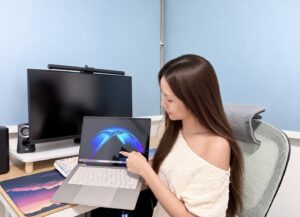
The HP OmniBook Ultra 14 is the sort of laptop that makes a strong first impression. Finished in Eclipse Grey, it looks clean, understated and suitably premium. What stands out more immediately is the weight. At around 1.27kg, it feels noticeably light in the hand. It slips easily into a work bag, making it an appealing companion for anyone who moves regularly between home, office, meetings and cafés.
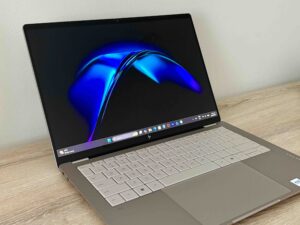
Open the lid, and the 14-inch 3K OLED touchscreen quickly becomes one of the laptop’s biggest highlights. With a resolution of 2880 x 1800 pixels and a 120Hz refresh rate, everything from text and webpages to photos and videos looks crisp and smooth. Colours are rich, blacks are wonderfully deep, and there is a pleasing sense of contrast that makes the display feel more luxurious than a typical productivity notebook. The taller 16:10 aspect ratio also gives you a little more vertical space for documents, spreadsheets and web browsing, which makes a subtle but noticeable difference during a long working day.
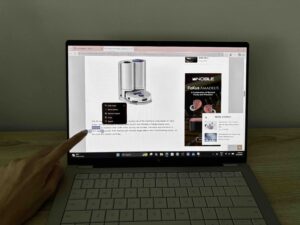
The touchscreen is another feature that feels more useful the longer you spend with it. It is easy to dismiss touch on a conventional laptop as unnecessary, but tapping through menus, scrolling through webpages or quickly selecting something on-screen soon becomes second nature. It is not essential, but it adds another layer of convenience, particularly when you are using the laptop away from a desk.
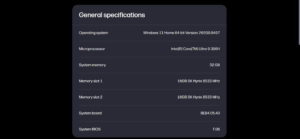
Performance is equally effortless. This configuration comes with an Intel Core Ultra 9 386H processor, 32GB of memory and a 1TB SSD, and in everyday use the OmniBook Ultra feels consistently quick and responsive. Applications open rapidly, switching between browser tabs, Microsoft Office, messaging apps and media is seamless, and the machine rarely feels as though it is being pushed particularly hard. For the way most people work today, with multiple applications running at once rather than one heavy programme in isolation, the generous 32GB of memory feels especially useful.
That said, this is still primarily a premium productivity machine rather than a gaming laptop or mobile workstation. The integrated Intel graphics are perfectly capable for everyday creative work, media consumption and lighter editing, but those working regularly with demanding 3D applications, complex video projects or high-end gaming will still be better served by a laptop with dedicated graphics.
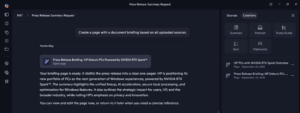
As with many new premium laptops, AI is a major part of HP’s messaging. The processor includes a dedicated NPU capable of 50 TOPS of AI performance, allowing compatible tasks to run locally rather than relying completely on cloud processing. It also qualifies the OmniBook Ultra as a Copilot+ PC.
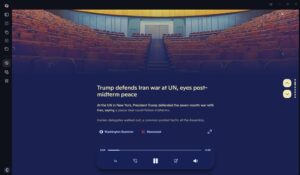
I also found myself using Copilot in a much more everyday way. One of my favourite uses was simply asking it for an overview of the day’s news, especially on busy mornings when I did not have time to jump between multiple sites. It could quickly pull together the main headlines and give me a concise sense of what was happening, and even read it out to me.
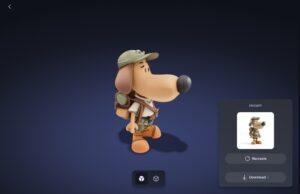
I also spent some time playing around with 3D modelling and manipulating more complex images, which gave the OmniBook Ultra a little more to chew on. Even as I rotated models, adjusted elements and moved around the workspace, everything remained smooth and responsive, with no noticeable lag during my testing. It was a good reminder that despite its slim and lightweight build, there is plenty of performance underneath for more demanding creative work.
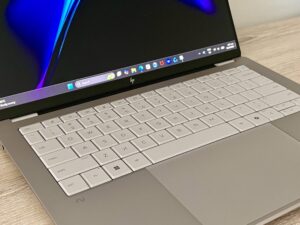
The OmniBook Ultra is also pleasant to use over longer stretches. The keyboard is comfortable enough for extended typing sessions, while the spacious touchpad makes navigation easy when you are working without a mouse. These may sound like small details, but on a lightweight notebook designed to be used anywhere, they matter. A laptop can look impressive on paper yet become frustrating if the keyboard is cramped or the touchpad feels awkward, and thankfully that is not the case here.
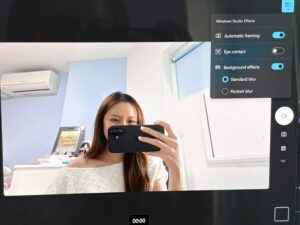
Video calls are another area where HP has put in some effort. The 5MP infrared camera provides a noticeably more premium setup than the basic webcams still found on many laptops, while Windows Hello facial recognition makes logging in fast and convenient. For anyone who spends a significant amount of time on Teams or Zoom, the camera hardware is arguably more useful in day-to-day life than many of the more heavily promoted AI features.

Audio comes through a quad-speaker system tuned with Poly Studio, and it performs well for such a slim machine. It is not going to replace a good pair of headphones, but voices are clear during meetings, and there is enough presence for YouTube, Netflix and casual music listening. Again, it is one of those areas where the OmniBook Ultra feels well-rounded rather than simply focused on processor performance.
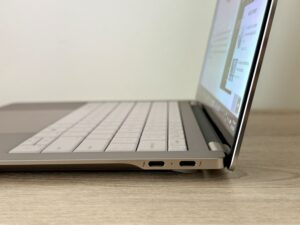
Connectivity is where the minimalist design introduces one of its more obvious compromises. You get three Thunderbolt 4 USB-C ports, which cover charging, fast data transfer and external displays, but there is no traditional USB-A port, full-sized HDMI socket or memory-card reader. If most of your accessories are already USB-C, this will not be much of an issue. If you still regularly use older thumb drives, mouse receivers or office projectors, however, a small USB-C hub will probably become a permanent fixture in your bag.
Wireless connectivity is much more future-ready, with Wi-Fi 7 onboard, and the overall impression is that HP has designed the OmniBook Ultra around a modern, largely wireless and USB-C-based working environment. It keeps the chassis clean and slim, but whether you see that as elegant or slightly inconvenient will depend very much on the accessories you already use.
Battery capacity is generous for such a compact machine, with a 70Wh battery inside. Real-world endurance will naturally vary depending on brightness, workload and how often you take advantage of the 3K OLED display and 120Hz refresh rate, but the large battery gives the OmniBook Ultra a solid foundation for mobile use. Fast charging is also useful when you need to top up quickly between meetings or before heading out again.
The low weight makes you more likely to carry it around. The OLED screen makes it more enjoyable every time you open it. The processor and 32GB of memory ensure that everyday work feels effortless, while the webcam, speakers and touchscreen improve the smaller moments you encounter throughout the day.
After spending time with the HP OmniBook Ultra 14, what stands out most is how unobtrusive it feels. Combined with its excellent OLED display, lightweight design and strong everyday usability, that makes it a convincing example of what a modern premium ultraportable should be. It retails from S$4,199.
Find out more here.