


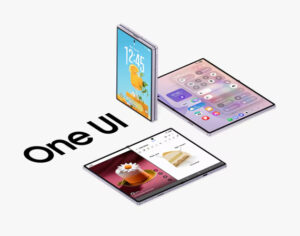
Samsung is bringing its latest mobile software experience to more users with the official rollout of One UI 9, starting with the Galaxy S26 series before expanding to additional eligible Galaxy smartphones and tablets.
Beginning September 21, the update will initially reach the Galaxy S26, Galaxy S26+ and Galaxy S26 Ultra. One UI 9 previously made its debut on Samsung’s Galaxy Z Fold8 Ultra, Fold8 and Flip8, giving the company’s latest foldables first access to its new interface and Galaxy AI capabilities.
This time, Samsung is putting greater emphasis on practical AI features that reduce the amount of manual work involved in everyday tasks. New additions range from automatically reframing recorded videos around a particular person to personalised daily briefings, improved translation and AI-powered privacy monitoring.
My FanCam Automatically Follows the Action
One of the more interesting additions is My FanCam, which tackles a common problem when recording performances, sports or other busy events.
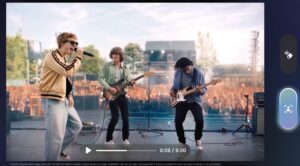
Rather than requiring users to manually crop and track someone afterwards, My FanCam can identify a selected person within a recorded video and automatically keep them centred as they move through the scene.
Samsung sees applications ranging from parents filming their child’s performance to capturing a friend dancing or following an individual player during a sporting event. The resulting footage is automatically reframed around the chosen person, making it easier to produce clips suitable for sharing on social media.
It is a good example of the direction Samsung is taking with Galaxy AI: using AI less as a standalone feature and more as a way of removing repetitive editing work.
Now Brief Becomes More Personal
Samsung is also giving users greater control over Now Brief, its daily information summary.
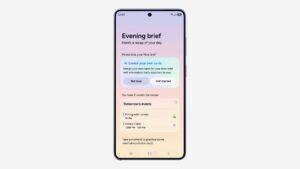
New Generative and Editable Cards allow users to determine more precisely what appears in their briefing. Cards can be created around categories such as health, weather and video, making the experience less of a predetermined feed and more of a personalised daily dashboard.
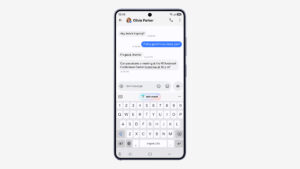
Another addition, Now Nudge, tries to anticipate the next action a user may want to take based on what they are currently doing.
For example, if friends are discussing plans through text messages, Now Nudge could surface relevant reservation information or provide an option to save a location that has been shared in the conversation — without requiring the user to leave the chat and search through another app.
The aim is to reduce the number of steps between recognising something that needs to be done and actually doing it.
Creative Studio Gets More Timely
Creative Studio is becoming more proactive too.
Instead of waiting for the user to decide what to create, One UI 9 can suggest image-generation ideas based on upcoming events. If a friend’s birthday is approaching, for example, the software may suggest generating a themed image or personalised greeting.
It represents a subtle shift in generative AI from a blank prompt box towards contextual assistance, where the phone can suggest when its creative tools might actually be useful.
Interpreter Makes Conversations Easier to Follow
Samsung has also refined Interpreter for multilingual conversations.
A new Thread View allows users to look back through earlier translated exchanges, making longer conversations easier to follow instead of treating each translated sentence in isolation.
Conversation Mode also gains faster translation, while playback through compatible Galaxy Buds has been accelerated to reduce the delay between someone speaking and the listener hearing the translated version.
The improvements are designed to make translated conversations feel more continuous, particularly when people are speaking back and forth in different languages.
Better Scanning and Voice Recording
Some of the most useful One UI 9 improvements are considerably less flashy.
Document Scan has been upgraded to better handle difficult source material, including curved book pages and papers with folded corners. Improved large-screen layouts on compatible Galaxy devices and an enhanced Finger Eraser are intended to produce cleaner digital copies with less manual correction.
Voice Recorder is also making its AI-generated summaries easier to digest. Rather than presenting information as large blocks of text, summaries can incorporate structured elements such as headings and tables, helping users find important points more quickly.
For students and professionals recording lectures, interviews or meetings, that could make the resulting transcription and summary considerably more practical to revisit.
Device Support Moves Into Settings
One UI 9 also introduces Warranty and Care, bringing information that users may previously have needed to search for into the Settings menu.
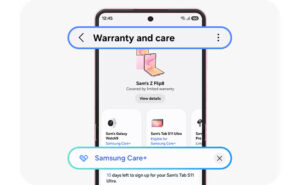
Users can check warranty coverage for connected mobile devices, perform self-diagnostics and see repair estimates. Samsung Care+ can also be managed from the same area, with users able to arrange a service appointment when necessary.
It effectively turns Settings into a more complete device-management centre rather than limiting it to software and hardware configuration.
AI Looks for Privacy Risks in the Background
Security and privacy receive their own AI-assisted upgrades.
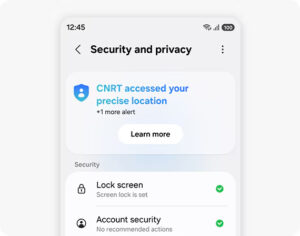
A new Security Brief can surface important security information through Now Brief, including malware warnings, apps installed from unknown sources and permissions that may no longer be necessary.
Privacy Alerts go a step further by using on-device AI to identify potential privacy concerns, including unnecessary attempts by apps to access permissions while running in the background.
Instead of expecting users to regularly dig through privacy menus, Samsung is attempting to surface potentially unusual behaviour when it becomes relevant.
Scam Detection is also expanding to additional countries and languages, extending Galaxy’s ability to identify potentially fraudulent calls to more supported markets.
More Galaxy Devices Are Next
The September 21 rollout marks the beginning rather than the end of One UI 9’s deployment.
After the Galaxy S26, S26+ and S26 Ultra, Samsung plans to bring the update to additional eligible Galaxy smartphones and tablets in phases, although the company has not provided a complete rollout schedule in this announcement.
Find out more here.