




Apple is preparing to roll out one of the biggest upgrades to the iPhone experience this year with a wave of new Apple Intelligence features designed to make Siri more capable, Photos more powerful and everyday tasks significantly easier. Rather than focusing solely on generative AI, Apple is weaving intelligence throughout iOS, iPadOS and macOS, helping users find information faster, automate repetitive tasks and communicate more naturally while keeping privacy at the forefront.
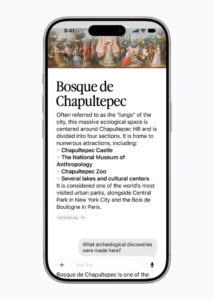
One of the biggest changes is the arrival of a much smarter Siri. Instead of simply responding to commands, Siri will gain personal context awareness, allowing it to search across Messages, Mail, Photos, Notes and other apps to locate information you’ve previously seen. Whether you’re trying to find the restaurant recommendation a friend sent months ago, an old holiday photo, or an important email buried deep in your inbox, Siri will be able to retrieve it through simple natural language requests.
Siri will also become far more knowledgeable by combining its personal understanding with broader web intelligence. Users can ask about travel destinations, upcoming concerts, historical facts or almost any general topic without leaving the conversation, making Siri feel more like an intelligent assistant than a traditional voice search tool.

Another major upgrade is onscreen awareness, enabling Siri to understand exactly what’s displayed on your screen. For example, while viewing an online recipe, you can simply ask Siri to add the ingredients to your grocery list. If you’re reading an event invitation, Siri can help create calendar appointments or perform other relevant actions based on what you’re currently viewing.
The Camera app also becomes smarter with an all-new AI-powered mode that lets users ask questions about objects and places around them in real time. Beyond identifying landmarks or products, Siri can provide useful contextual information, including nutritional insights when pointing the camera at a meal, making visual search a far more practical everyday tool.

Writing assistance is also receiving a significant boost. Whether you’re drafting an email, writing social media captions or replying to messages, Siri can help generate, edit or proofread text directly where you’re typing. Even better, the AI can adapt its writing style based on the person you’re communicating with, allowing replies to sound more personal and appropriate for different conversations.
On the Mac and iPad, Apple Intelligence integrates directly into Spotlight, allowing users to ask questions without opening a browser. Simply right-clicking on text, files, or images will also provide instant AI-powered explanations or additional information without disrupting ongoing work, streamlining research and productivity.

Photography enthusiasts will benefit from several new editing tools powered by Apple Intelligence. Spatial Reframing allows users to adjust the composition of a photo after it has been taken, while Extend intelligently expands image borders to create more balanced compositions or resize photos for wallpapers and social media. Apple’s enhanced Clean Up tool has also been upgraded to remove unwanted people and distractions with improved realism, making photo editing simpler than ever.

Safari is also becoming more proactive with Notify Me, a feature that monitors selected web pages and alerts users when changes occur. Whether waiting for concert tickets to become available, tracking product restocks or watching for price drops, users no longer need to repeatedly refresh websites manually.

Apple is also improving the phone experience with Call Context, which automatically surfaces useful information during calls with businesses. Reservation numbers, booking confirmations or reference codes can appear automatically inside the Phone app, reducing the need to search through emails while speaking to customer service.

Creative users will gain access to an entirely redesigned Image Playground, Apple’s AI image generation platform. Users can create illustrations in a wide variety of styles simply by describing what they want, while editing existing images becomes more intuitive by allowing objects to be selected, circled or described for AI-powered modifications.
Automation is becoming much more accessible through Describe a Shortcut. Instead of manually building workflows, users simply explain what they want to automate in plain language. Whether it’s generating a personalised morning briefing, turning on smart home devices at specific times or automating daily routines, Apple Intelligence builds the Shortcut automatically.

Alongside these productivity features, Apple is introducing several important improvements for families. Child Accounts now make it easier to create age-appropriate experiences from the moment a device is set up, while Communication Safety expands to automatically block violent or graphic content shared through messages for users under 18. Parents also gain more control through new Time Allowances, allowing daily usage limits for games, entertainment and social media, as well as a redesigned Screen Time dashboard that provides clearer insights into children’s device usage and app activity.
With Apple Intelligence deeply integrated across Siri, Photos, Safari, Camera, Shortcuts and system apps, Apple is moving beyond standalone AI tools to create a smarter, more personal ecosystem. Rather than requiring users to learn new workflows, these features aim to make everyday tasks faster, more intuitive and seamlessly woven into how people already use their iPhones, iPads and Macs.